
What is Title Search: Process, Challenges, Automation and AI Best Practices
 Oct 5th, 2026
B2B email validation keeps poor-quality data from hurting your campaigns by reducing bounce rates, improving inbox placement, protecting sender reputation, and strengthening the overall performance of your outreach.
Table of Contents
B2B email validation checks whether email addresses are correctly formatted, deliverable, and ready for outreach before use in outbound campaigns. Email validation focuses on format and deliverability, while verification confirms a real recipient is behind the address.
A 5% hard bounce rate can get your account suspended by ESPs like Mailchimp, HubSpot, and Klaviyo. Since B2B databases decay by 22.5% annually, a 50,000-contact list may lose about 11,250 valid emails a year without regular verification. Bad addresses do more than bounce. They damage sender reputation, increase bounce rates, and can trigger domain-level restrictions under Gmail and Yahoo’s 2024 bulk sender rules.
Email validation best practices are no longer optional hygiene – it is now required for compliant outbound e-mail. This guide will walk through 4 sequential ways of email validation, how to deal with Catch-All Domains and Spam Traps, and provide some frequency guidelines we have seen while validating > 50 Million B2B records.
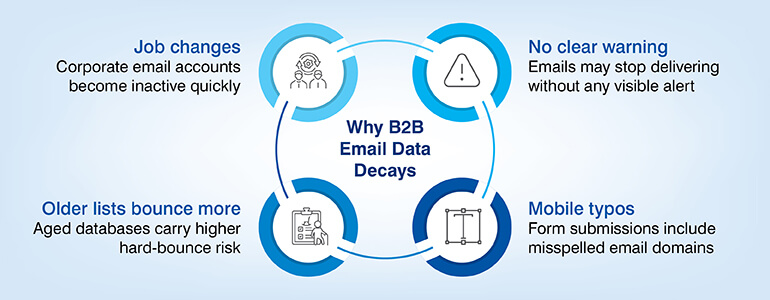
B2B email lists are not static tools as contact information from those lists change, (i.e., job changes, abandoning an account, switching service providers) they do so quickly enough that reviewing a B2B list annually does not provide adequate time for review or updates.
As reported by HubSpot’s State of Marketing study, B2B databases have an overall decay rate of 22.5% per year. For example, if you’re a marketing team sending out a campaign every quarter to a list with 100,000 records, approximately 5,600 records will be considered “bad” (invalid email addresses) by each send-out without being identified.
Job changes & corporate email address changeover
The average length of U.S. employment is 4.1 years, based on the data provided by the Bureau of Labor Statistics. Each time a person leaves their current position a corresponding email account at a corporation becomes inactive within days of leaving and is therefore an invalid email address within your database.
Consumer email addresses are typically retained for years after an individual has changed roles; however, corporate email accounts are disabled within days of an employee leaving an organization. In many cases there is no forwarding option, no bounce message returned in all configurations, and no communication to the sender about the inactivity of the email account. The account simply ceases to deliver.
Hitech BPO has found through its validation of B2B databases for several SaaS and FinTech clients, that approximately 60% of “hard” bounces for lists older than 18 months were due to job changes resulting in invalid email addresses.
A third, underestimated source for bad emails is mobile device submissions. Typo rates are much higher on mobile devices compared to desktops because people tend to use shorter, easier-to-type versions of domain names (e.g., gmial.com, yaho.com, @companay.com). Until these get caught by a syntax checker, they are passed over without notice. Databases built using information collected through event registration forms and/or gated content submission forms can have typo rates ranging from 3–5%.
In February 2024 both Gmail and Yahoo have made some new “requirements” for anybody who wants to send 5000+ emails per day to their systems. These requirements will be around Authentication, Complaint Thresholds and Unsubscribe Mechanisms. If you do not comply with these requirements, then the emails you are sending may be rejected outright or route directly to the SPAM box, however this is not something that happens on an individual basis – all of your emails will be affected because they are coming from the same sending domain.
The most direct way that Email Validation relates to this is: invalid email addresses that bounce back or remain unopened increase your Spam Complaint Ratio. Many email addresses that appear on bought or old email lists could be identified as SPAM Traps (blacklist organizations use SPAM Traps to identify and track down spammers). Just one single SPAM Trap Hit can trigger a Spamhaus or SURBL Blacklisting of your domain, which would affect every single email you send out – regardless of where you are sending it.
Below is a table mapping the new Gmail / Yahoo Requirements to how Email Validation addresses them:
| Requirement | What it means | How email validation helps |
|---|---|---|
| SPF / DKIM / DMARC | Email authentication protocols | Validated lists reduce the ratio of invalid sends, keeping authentication pass rates high |
| Spam complaint rate < 0.3% | Measures how often recipients mark your email as spam | Invalid addresses that bounce or go unread inflate complaint ratios; removing them keeps your rate below threshold |
| One-click unsubscribe | Recipients can opt out in a single action | Validated, opted-in lists have lower unsubscribed intent; SMTP-verified lists avoid sends to traps that generate automatic complaints |
Protect sender reputation with smarter B2B email validation.
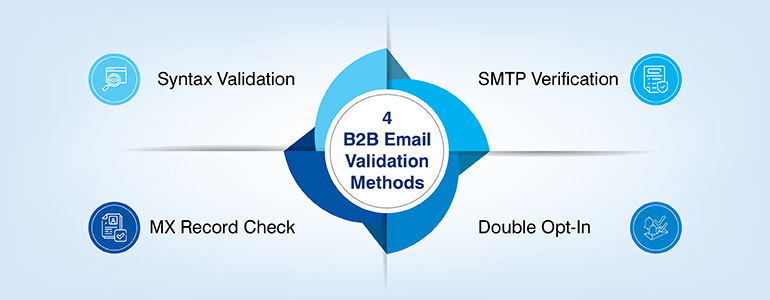
These four functions work sequentially; they do not replace each other. The layers catch everything that the previous layer does not. If you run SMTP validation on a bad address, you will waste your API calls. If you run syntax checks on a previously SMTP verified list of addresses, you have added no value.
In this order, they provide a valid database where all remaining addresses are correctly formatted; are hosted on an active mail server; have a mailbox attached to it; and for inbound contacts have been confirmed by the recipient.
Real-time syntax validation uses a regular expression to verify whether an email address has been entered into your CRM according to the standard defined by RFC 5322, the Internet Standard for Email Message Format. The most important elements of an email address are the local part (before the @) the @ character and the valid Top-Level Domain (TLD).
The syntax check identifies missing @ characters, double dot characters within the local part (jo..hn@domain.com), white space within the email address, and TLDs that have no valid TLD. A properly formatted email address will pass a syntax check even if the recipient’s mailbox does not exist (john.doe@validcompany.com). Therefore, syntax checking does not identify cases where a properly formatted address references a non-existent mailbox.
When to use: Immediately upon submitting the form. Since syntax checks are relatively inexpensive as far as computational resources go, they can be easily integrated into your web forms, your CRM workflow for creating new entries, or through any of the numerous email validation APIs available (ZeroBounce, NeverBounce, Hunter are examples).
By catching incorrectly formatted email addresses immediately after submission you eliminate the possibility of those addresses being stored in your CRM database. That is the least expensive method of validating email addresses.
Once you’ve validated the MX record syntax, an MX record query is made to the DNS database to see if the sending email’s domain has a mail exchange set up. A mail exchange is a configured mail server that accepts inbound emails.
There are many cases where a domain passes a syntax test but doesn’t have mail exchanges (a.k.a. no mail server). These include:
In all cases, when an email address is sent to an invalid domain, it will be bounced because there isn’t a server to accept the email.
The time it takes for an MX record query is very short, generally less than 1 second. It is also inexpensive to run large volumes of them. Therefore, running an MX record check prior to an SMTP to verify helps eliminate non-deliverable records that would otherwise needlessly consume resources for the next step.
SMTP verification will initiate a partial handshake of the email process with the recipients email server; it will follow the SMTP process (EHLO, MAIL FROM, RCPT TO) but stop once it receives its response to RCPT TO. Once you receive your response, if it is positive, it means there is an active mailbox associated with that address at that email server.
Step three is by far the best step for email validation for B2B database and contains the biggest technical limitations to validations: Catch-all domains.
A “catch-all” domain accepts mail addressed to any account within that domain. It will typically return a positive SMTP response to all addresses at that domain regardless of whether the actual mailbox exists. In many large enterprises, organizations have chosen to implement catch-all configurations in order to avoid losing emails sent to former employees or to prevent errors when typing an alias.
However, an SMTP test will often show the domain as being valid; however, it is possible the email could be bounced or lost in transit.
Catch-all domains are the default setting on 40-60% of all B2B domains in most enterprise databases. There is no way to validate catch-all domains using SMTP. As such, they should be segmented as “risky” – removed from cold outbound campaigns, but don’t remove them. Since there is likely a CRM engagement history showing the contact has opened or clicked on something previously – that previous engagement record is much better evidence of deliverability than the smtp status.
Secondary limitation: More and more Microsoft 365 and Google Workspace tenants have started greylisting. Greylisting can reject SMTP probes temporarily. Most robust SMTP verification companies include retry logic for this issue; however most single pass SMTP verifications will incorrectly flag greylisted addresses as invalid.
In cases where a client’s bulk validation of B2B data results in catch-all responses at Hitech BPO, we then validate that catch-all response with CRM interaction history (opens, clicks, replies) prior to determining if the record is suppressible. If a client does not have an engagement history, we suggest a small test send of a random sample of catch-all responses to determine an empirical bounce rate so the entire segment can be suppressed.
Reduce bounce rates with a structured email validation process.
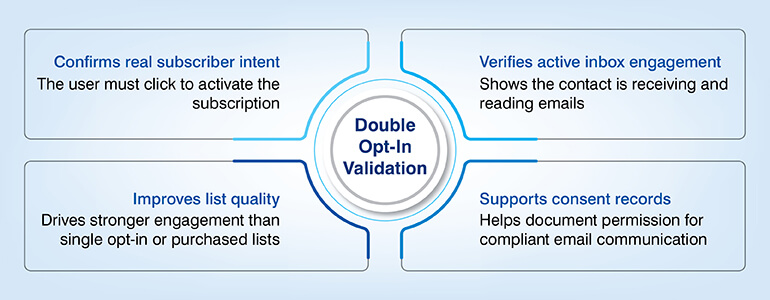
Double opt-in is a process of sending a new subscriber a confirmation e-mail with a link to confirm their subscription. In order to confirm, the person must click the link to activate their subscription. Double opt-in is different from all other three options; double opt-in does not validate cold lists, purchased lists, etc.
It only validates subscribers who have opted into your mailing list through an inbound lead capture method (web form, content download, webinar registration, free trial).
The only thing double opt-in verifies that SMTP verification can’t verify is that a person is actually reading their inbox and has willingly subscribed to communications from you. Why does this matter? Two reasons.
First, people are more likely to engage (open emails) with messages sent to double opt-in lists compared to messages sent to single opt-in or purchased lists.
Second, in accordance with GDPR Article 7, double opt-in allows you to document when a contact gave consent to communicate with them. For businesses that have B2B contacts within the European Union, this documentation will serve as evidence of lawful basis for data processing.
All 4 Methods at a Glance
Use this table to match the right email validation method to your specific use case:
| Method | What It Catches | What It Misses | Best Used For | Speed |
|---|---|---|---|---|
| Syntax Verification | Malformed addresses, missing @ or domain | Valid-format but non-existent addresses | Form submission (real-time) | Instant |
| MX Record Lookup | Dead domains, parked domains, no mail server | Inactive mailboxes on live domains | Bulk database hygiene | Fast (<1s/record) |
| SMTP Verification | Inactive mailboxes on live mail servers | Catch-all addresses (returns false positive) | Pre-campaign email list cleaning | Moderate |
| Double Opt-In | Unengaged or bot-submitted addresses | Existing cold or purchased lists | Inbound lead capture forms | Depends on user action |
Most articles about B2B email list validation view Catch-All domains as some sort of ‘edge case’. In reality, however, they represent the majority of all enterprise B2B databases. Spam Traps are also present in virtually every aged or purchased email list and will create irreparable harm when a blacklisting event happens. Therefore, understanding both is crucial for implementing a realistic validation strategy.
If an enterprise email system has been configured by its administrators to allow all incoming mail to be accepted regardless of who the intended recipient was, then SMTP verification would fail to identify john.smith@enterprise.com (an actual active email account) from xyznotreal@enterprise.com (an email address that does not exist which will silently discard the email), both of which return a successful SMTP response.
Enterprise IT departments have legitimate reasons to configure their systems with a “catch all” policy – e.g. receiving emails sent to ex-employees, receiving misspellings of aliases, or simply to capture messages for a team inbox. In this case, for the sender, SMTP verification will mark the email address as valid, while the actual delivery status is unknown.
How to handle catch-all addresses
Identify/segment your catch-all addresses into a different email list tier. Do NOT include your catch-all lists in cold mass-scale outbound emails.
For all warm contacts (anyone that has opened your email(s), visited your website, or responded to your outreach) it is assumed that their previous engagement will override the SMTP uncertainty. For all new catch-all addresses that have NO previous engagement history run a controlled test send of 200-500 addresses and then determine if you should turn on the full segment based upon the percentage of bounces.
Email spam traps are email addresses run by blacklisting organizations (anti-spam), internet service providers (ISPs) and anti-spam companies as an email trap for identifying spammers that do not maintain clean permission-based email contact lists. The first type is created on the ISP’s side and can be found in the database or through a web crawler. The second type is run by an anti-spam company using web crawlers. The third type is the one most commonly used by blacklisting organizations.
| Type of Trap | Definition | How It Enters a List | Main Risk | Primary Prevention |
|---|---|---|---|---|
| Pristine Trap | Email created only to catch spammers; never used by real people. |
|
|
|
| Recycled Trap | Old email abandoned and later reused as a spam trap. |
|
|
|
| Typo Trap | Email with common spelling mistakes used as spam traps. |
|
|
|
The correct frequency of email validation for B2B database depends on how often the data is updated and how frequently you send. Below are practical frequency benchmarks based on database size and activity level.
| Database Size / Threshold | Validation Frequency | Action |
|---|---|---|
| Under 10,000 records | Before every campaign; full check quarterly | Run syntax and MX validation before every campaign. Perform full SMTP verification quarterly or before high-volume sends. |
| 10,000–100,000 records | At entry; full check quarterly | Use automated syntax and MX checks at point of entry. Run full SMTP validation quarterly. |
| 100,000+ records | Real-time at entry; monthly full check | Use API-based real-time validation at entry. Run a monthly full-database SMTP pass. |
| 60-day inactivity | Trigger-based | Re-validate records with MX and SMTP checks before reactivation campaigns. |
| 120-day inactivity | Secondary checkpoint | Run full re-validation and consider a separate re-engagement sequence. |
The benefits of validating your email list are quantifiable in terms of the results you get from improving your sender’s reputation, improving the performance of campaigns you send out, and complying with regulations and laws.
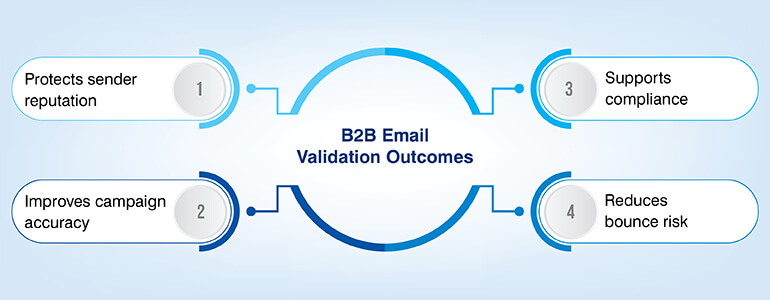
Sender reputation and ESP account protection
Sending out campaigns at high hard bounce rates (above 5%) can cause you to be suspended from using your account through many of the major ESPs as well as have limitations placed upon your sending rights (e.g. MailChimp, HubSpot, etc.) based on their respective thresholds. Using MX and SMTP verification prior to every campaign ensures that you are keeping your hard bounce rate below 0.5% (a safe range).
Accurate campaign analytics
Using a database with 18% of undeliverable emails skews your open rates, click rates, and conversion metrics. Because of this flawed denominator you have less reliable analytics to support better segmentation, content analysis, and sales qualification.
Case example
Hitech BPO completed a full validation of all 28,000 records and 80+ fields for a US-based financial advisory firm. In addition to validated email addresses, we included contact information, company data, and revenue figures. This allowed our client to obtain an accurate, integrated view of their customer portfolio. We were able to share this data with our clients economic development partners who require verified data to engage.
GDPR and CAN-SPAM compliance risk reduction
As stated in Article 6 of GDPR, a documented lawful basis is needed for the marketing related processing of personal data. Double-optin provides documentation of consent. As part of regular validation, it is easy to identify inactive contacts and remove them from the database. By doing so, the risk of receiving complaints under GDPR Article 17, right to erasure is reduced.
Under CAN-SPAM, maintaining suppression lists and adhering to opt-out requests is a requirement. Maintaining a well-validated list will help make this process much easier.
B2B email data decays at a very quick rate as people change jobs, domains expire, and bad entries make their way. Email validation of B2B database through syntax checks, MX lookups, SMTP verification, and double opt-in helps catch issues early and reduce waste.
Since Gmail and Yahoo have set stringent bulk sender rules in February 2024, email validation and maintaining email hygiene practices has become essential for protecting email deliverability for B2B, sender reputation, and inbox placement.
With B2B databases declining by 22.5% each year, email validation of lists is far more cost-effective than sending emails to invalid contacts.

What’s next? Message us a brief description of your project.
Our experts will review and get back to you within one business day with free consultation for successful implementation.

Disclaimer:
HitechDigital Solutions LLP and Hitech BPO will never ask for money or commission to offer jobs or projects. In the event you are contacted by any person with job offer in our companies, please reach out to us at info@hitechbpo.com