
What is Title Search: Process, Challenges, Automation and AI Best Practices
 Oct 5th, 2026
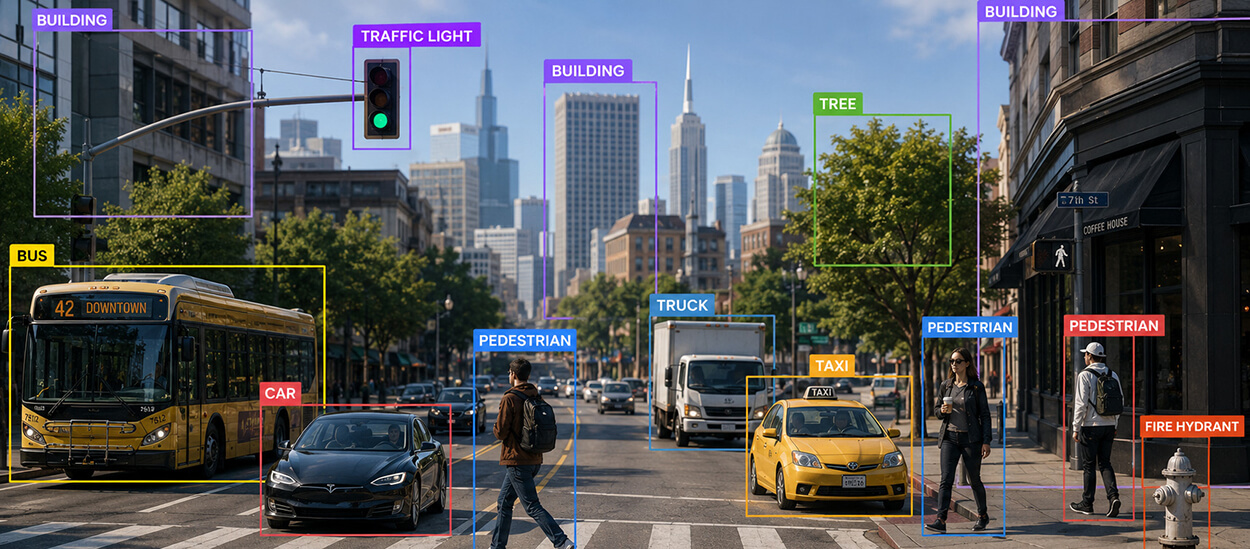
This data annotation guide covers annotation types and methods, a step-by-step workflow, tool comparisons, best practices, and real-world AI use cases across healthcare, retail, and autonomous vehicles.
Table of Contents
AI models don’t usually fail because of weak algorithms. They fail because of what those algorithms were trained on. That’s why the global data annotation tools market is scaling fast, from roughly $1.0 billion in 2023 to a projected $5.3 billion by 2030, according to grand view research.
Every computer vision, NLP, or generative AI system depends on annotated data to learn context. Most enterprise teams route this work to a dedicated annotation provider rather than an internal team, because a purpose-built workforce and QA process consistently outperform labeling squeezed in between other priorities.
This guide covers what data annotation involves in practice: the types and techniques, when to use manual versus automated methods, which tools fit which use case, the step-by-step workflow, and how it plays out across industries from autonomous vehicles to healthcare. Use the headings below to jump to what you need, or read it in order if you’re building an annotation strategy from scratch.
Data annotation is the process of labeling raw data – images, text, audio, or video, with tags that teach a machine learning model what it’s looking at. A bounding box around a car, a sentiment tag on a review, a timestamped transcript: each is an annotation giving the model a ground-truth reference to learn from.
For an ML pipeline, annotation is the step that turns raw data into something a model can actually train on; skip it or do it poorly, and every later stage inherits the error.
Without that reference point, a model can’t tell a pedestrian from a lamppost or a complaint from a compliment. Annotation quality sets a hard ceiling on downstream accuracy that no amount of compute or architecture tuning can raise.
Teams evaluating data annotation services are really evaluating how consistently a provider can hit that quality bar at volume, not just whether they can label a sample batch well.
Poor labeling doesn’t just create noise. It actively misleads the model. Researchers studying software vulnerability datasets found that correcting mislabeled training data alone dropped a model’s reported performance by up to 65%, because the original scores had been inflated by errors baked into the labels. The model wasn’t better, the ground truth was wrong.
A separate MIT-affiliated study found an average label error rate of at least 3.3% across ten widely used ML benchmark datasets, a small percentage that can still shift which model architecture looks best on a leaderboard.
Three consequences follow directly from annotation quality:
This is why annotation guidelines, inter-annotator agreement (IAA) tracking, and multi-level review matter as much as the labeling itself.
Different data formats need different annotation techniques. Choosing the wrong one for your use case either under-serves the model or wastes budget on precision you don’t need.
| Type | Use Case | Example | Common Tools | Complexity |
|---|---|---|---|---|
| Image annotation | Computer vision, object detection, autonomous systems | Bounding boxes on vehicles in a traffic dataset | CVAT, Labelbox, SuperAnnotate | Low-High (varies by technique) |
| Text annotation | NLP, chatbots, LLM fine-tuning | Entity tagging in support tickets | Prodigy, Labelbox, Doccano | Medium |
| Audio annotation | Speech recognition, voice AI | Transcribing and diarizing call center recordings | Amazon SageMaker Ground Truth, Praat | Medium-High |
| Video annotation | Surveillance AI, autonomous driving, sports analytics | Object tracking across frames | CVAT, SuperAnnotate | High |
Within image annotation specifically, technique choice matters most. Bounding box annotation draws rectangles around objects for detection, the foundation for the object detection models used in autonomous driving and retail vision. Semantic segmentation labels every pixel by class, useful where object boundaries matter, like medical imaging or lane detection. Keypoint annotation marks specific points, common in pose estimation and facial recognition.
For teams standardizing on one technique, the image annotation services breakdown covers which method fits which computer vision task.
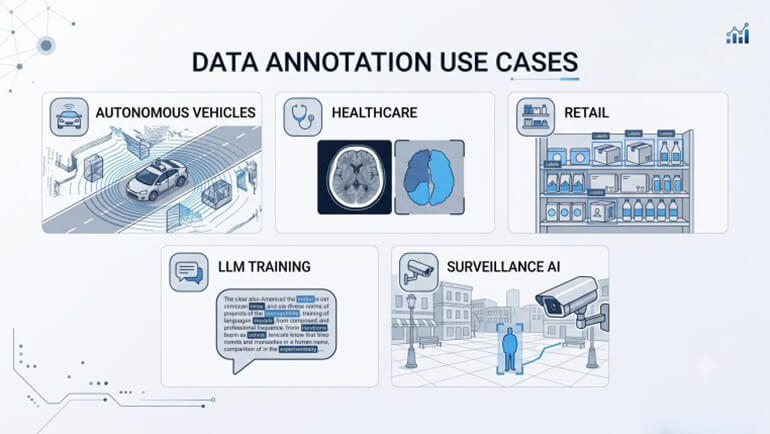
Annotation requirements shift significantly by industry. The accuracy bar, the data type, and the compliance load all change.
Autonomous vehicles: Self-driving systems depend on annotated LiDAR point clouds, camera frames, and radar data to detect pedestrians, lane markings, and other vehicles in real time. A single frame can carry hundreds of annotated objects.
Healthcare AI: Diagnostic imaging models require pixel-level segmentation of tumors, organs, or anomalies, typically annotated by clinically trained specialists under HIPAA-compliant workflows.
Retail AI: Product recognition, visual search, and inventory tracking rely on annotated catalog images. Hitech BPO’s image annotation for a swiss food waste assessment company shows how granular image labeling supports retail-adjacent sustainability analytics at scale.
LLM training: Large language models need human-in-the-loop annotation for instruction tuning, RLHF ranking, and factuality checks, text-heavy work with high linguistic and domain-expertise demands.
Surveillance AI: Video annotation trains models to detect anomalies, track objects across frames, and flag events. A video annotation project for a data analytics company illustrates how frame-level labeling supports downstream analytics products.
Struggling with the complexities of data annotation? Turn challenges into triumphs.
There are three ways to get data labeled, and the right choice depends on volume, timeline, and how much precision the model needs.
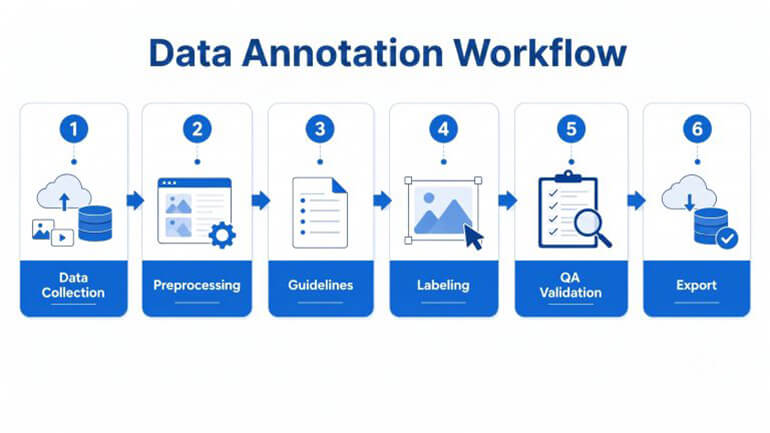
A repeatable workflow is what separates annotation projects that scale from ones that collapse under their own inconsistency.
Skipping step 3 is the single most common cause of expensive rework. Ambiguous guidelines produce inconsistent labels that surface only after training has already started.
For a closer look at applying this workflow to a live model build, see our guide on data annotation for ML projects.
Tool choice depends on whether you need a self-serve platform, a managed workforce, or both. Here’s how four widely used options compare.
| Tool | Strengths | Weaknesses | Enterprise Fit | Pricing Level | Scalability |
|---|---|---|---|---|---|
| Labelbox | API-first, strong project management, model-assisted labeling | Costs scale quickly with usage; workforce not included | Strong for engineering-heavy teams managing their own labelers | Custom / enterprise-tier | High |
| CVAT | Free, open-source, full control over workflows | Requires in-house setup and QA; no managed workforce | Better for startups and research teams with technical capacity | Free (self-hosted) | Medium (manual scaling) |
| SuperAnnotate | Strong automation and QA for computer vision, built-in workforce option | Less flexible outside computer vision use cases | Strong for CV-heavy enterprise projects | Custom / enterprise-tier | High |
| Amazon SageMaker Ground Truth | Native AWS integration, pay-as-you-go | Steeper setup curve outside the AWS ecosystem | Strong for teams already standardized on AWS | Pay-as-you-go | High (cloud-native) |
None of these platforms include a trained, managed annotation workforce by default. That’s the layer BPO annotation providers exist to fill, either alongside these tools or independent of them.
Whether to annotate in-house or bring in a specialized partner comes down to workload pattern, data sensitivity, and the capabilities your team already has.
In-house makes sense for continuous, long-term annotation needs with sensitive data that can’t leave your infrastructure. Outsourcing wins for variable workloads, seasonal spikes, or projects needing capabilities you don’t have internally.
Outsourced annotation teams bring an existing bench of trained specialists and established QA processes, advantages that take an internal team months to build from scratch. Most providers can also absorb sudden volume increases far more smoothly than an internal team can hire and train for a temporary spike, provided labeling guidelines are locked in early.
Empower your AI models with enhanced data quality, annotated at scale.
These terms get used interchangeably, but they describe different levels of specificity.
| Term | Meaning | How It Differs |
|---|---|---|
| Data annotation | The broad process of tagging raw data with any metadata a model needs to learn from. | Umbrella term covering labeling, classification, segmentation, and tracking. |
| Data labeling | Assigning a specific tag or category to a data point. | A subset of annotation, often used interchangeably with it in practice. |
| Classification | Sorting data into predefined categories, usually at the item level (not sub-item). | The narrowest term – one specific labeling task, not a full annotation methodology. |
In practice: all classification is labeling, all labeling is annotation, but not all annotation is classification. Segmentation and tracking, for example, are annotations without being classification.
Accuracy improvement: Run gold-standard test sets through every annotator before they touch live data, and re-test periodically to catch drift. Track inter-annotator agreement continuously, not just at project close.
Quality assurance: Use multi-level review, with a first pass by the annotator, a second by a QA reviewer, and a sampled audit by a project lead. Flag disagreements back into the guidelines document so the same ambiguity doesn’t recur.
Reducing bias: Diversify the annotator pool across demographics and geographies where the task calls for it, and audit label distributions for skew before training starts, not after a model ships with a blind spot.
Scalability: Ramping from a pilot batch to millions of items exposes guideline gaps that a small test set never surfaces.
Resource load: Complex annotation types like segmentation, video tracking, and LiDAR demand disproportionately more time and specialist effort as volume grows, especially with tight accuracy SLAs.
Human error: Fatigue, ambiguous edge cases, and inconsistent interpretation of guidelines all introduce noise that pure volume makes harder to catch.
Data complexity: Multimodal datasets that combine image, text, and audio for generative AI training require annotators and QA processes that can handle more than one data type at once.
Model performance is decided long before training starts, at the point where raw data becomes labeled data. Getting annotation types, methods, and QA processes right the first time is far less disruptive than fixing a biased or inaccurate dataset after deployment.
The annotation strategy behind a dataset matters as much as the model architecture built on top of it. Whether you label in-house or outsource, the fundamentals in this guide, from method selection to QA workflow, decide whether the resulting model actually performs.
What’s next? Message us a brief description of your project.
Our experts will review and get back to you within one business day with free consultation for successful implementation.

Disclaimer:
HitechDigital Solutions LLP and Hitech BPO will never ask for money or commission to offer jobs or projects. In the event you are contacted by any person with job offer in our companies, please reach out to us at info@hitechbpo.com