
What is Title Search: Process, Challenges, Automation and AI Best Practices
 Oct 5th, 2026
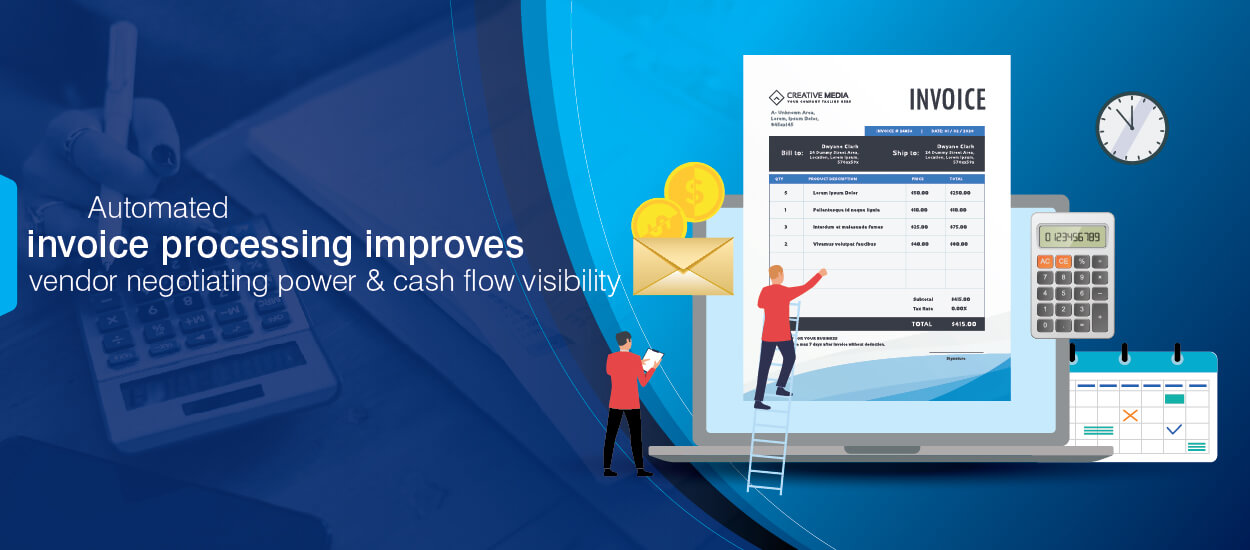
Automating invoice processing reduces unnecessary manual steps, speeds up workflows and eliminates potential errors. Selecting the right invoice automation tools is the key to improving efficiency and accuracy.
Table of Contents
If your payments are getting delayed and you are stuck with approval bottlenecks and vendor disputes, then you need to look into your invoice processing systems. What may have looked as routine finance task initially, can become unmanageable as volume grows. Shifting to automation from manual invoice processing gets mandatory.
The financial impact of manual invoice processing workflows is much high than many organizations realize. A 2024 audit by the U.S. Office of Inspector General found that the Environmental Protection Agency (EPA) had placed nearly $1.2 billion of taxpayer funds at risk due to weaknesses in manual invoice processing workflows.
Paper based invoicing carries multiple risks. From being a time-consuming process, it turns out expensive, error prone and slows down the process. Many organizations also face compliance failures by depending too much on manual processes.
Investing in automating invoice processing is no more an option with large organizations. Machine learning, optical character recognition (OCR) and other modern technologies is a must to streamlining accounts payable processes and reducing manual data entry.
In this blog, we explore how automating invoice processing helps businesses improve processes. The blog will act as a complete guide to workflow, implementation steps, operational benefits, and process architecture in detail.
Modernize invoice processing before inefficiencies scale.
Automated invoice processing matters because it is closely connected to organization’s accounts payable (AP) system. While AP systems handle payment lifecycle, automated invoice processing includes invoice capture, data extraction and invoice approvals.
And invoice processing comes at a cost. For instance, organizations must pay for data storage and also hire people to validate invoices, handle errors, communicate with vendors and review exceptions.
The cost for invoice processing is inevitable, but it can be reduced by using automation. Enterprises that rely on only manual processing incur a much higher cost compared to enterprises who invest in automation.
The cost difference may look negligible if you consider per invoice cost but imagine how much it will compound when you have to process thousands of invoices every month.
Automating invoice processing improves invoice processing efficiency streamlining the complete invoice-to-pay lifecycle. It supports faster invoice approvals, high invoice accuracy, reduced processing cost and better vendor relationships.
Manual vs Automated Invoice Processing
| Area | Manual Invoice Processing | Automated Invoice Processing |
|---|---|---|
| Invoice Capture | Emails, paper invoices, manual sorting | Centralized digital intake |
| Data Extraction | Manual data entry | OCR and AI-based extraction |
| Approval Workflow | Email follow-ups and manual routing | Automated approval routing |
| PO Matching | Manual verification | Automated 2-way/3-way matching |
| Exception Handling | Reactive and inconsistent | Rule-based validation workflows |
| Processing Speed | Delayed approvals | Faster invoice cycle times |
| Audit Readiness | Fragmented records | Complete digital audit trails |
| Scalability | Requires headcount growth | Supports high-volume processing |
Most organizations don’t realize the hidden costs associated with manual invoice processing. What the company looks at is the salaries of AP staff. But the real cost includes error correction time, late payment penalties, missed early payment discounts and approval bottlenecks.
Companies often miss on opportunity costs also when the core team gets involved in manual processing instead of strategic analysis and core tasks.
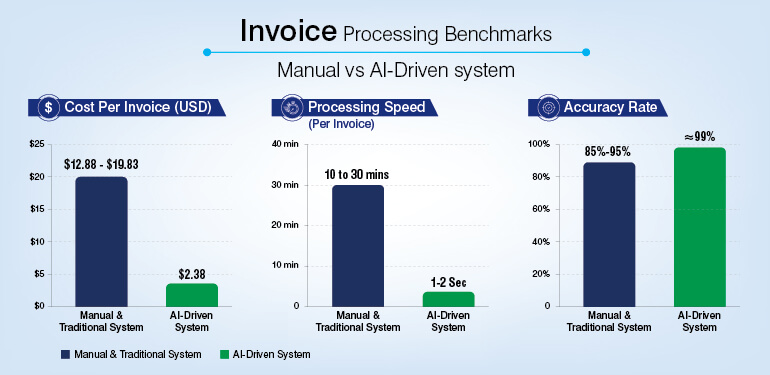
Research confirms that manual invoice processing costs around $16 between while companies using automation reduce this cost to $2-$5 per invoice. This amounts for a huge savings of up to 80% for high volume operations.
The comparison below highlights how automation improves invoice processing performance across cost, speed, and accuracy.
Reduce AP bottlenecks and improve processing control.
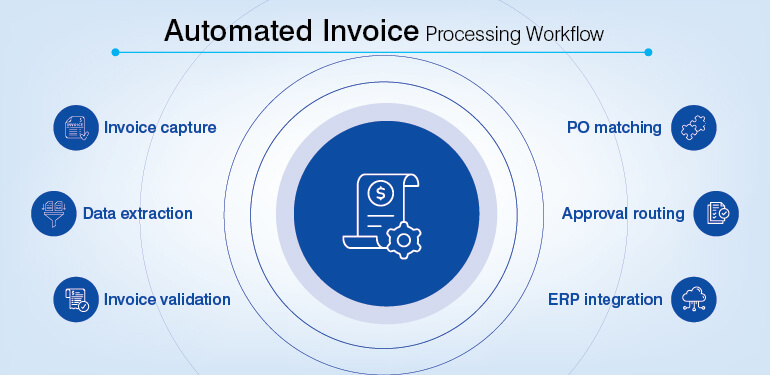
Automated invoice processing is not powered by a single tool. It is a connected workflow where multiple technologies work together to capture, extract, validate, approve, and post invoice data with minimal manual effort.
Automated invoice processing works as a connected workflow where many technologies work together. The effectiveness of the system depends on how well these layers work together.
High-performing AP teams are now achieving 60% to 80% auto-entry and touchless processing rates. Exceptions include PO mismatches, approval escalations, or new vendor records that still require human review.
A typical automated invoice processing workflow operates through six key stages:
Technologies Used in Automated Invoice Processing
| Technology | Role in Invoice Processing |
|---|---|
| OCR | Extracts invoice text and structured fields |
| Intelligent Document Processing (IDP) | Processes unstructured and multi-format invoices |
| Workflow Automation | Routes invoices for approval automatically |
| ERP Integration | Pushes approved invoice data into finance systems |
| PO Matching Engine | Validates invoices against purchase orders |
| AI-Based Validation | Detects anomalies, duplicates, and mismatches |
| Digital Archive | Stores invoices with searchable audit trails |
| RPA | Automates repetitive AP tasks and data movement |
Automated invoice processing is a gamechanger for AP departments. It offers various benefits with the potential to transform your business operations impacting cost, compliance and business growth.
Cost reduction and operational efficiency
Manual data entry is proving to be one of the largest operational costs in invoice processing. Doing things manually involves spending time on capturing invoice details, validating and routing approvals. With increase in volumes the processing cost also increases.
Once the need for manual input is replaced by automated systems the cost per invoice processed reduces drastically. Over time, these saving can add to a huge amount. Use of automated systems like workflows reduces processing time and improves invoice processing efficiency across high-volume AP operations.
Faster approvals, timely payments, early payment discounts and no late payment penalties, all add to the costs and profit margins. These contribute to huge cost savings.
Improved accuracy and fraud prevention
Manual invoice processing is not only time consuming but also error prone. There is always a risk of wrong payment amounts, duplicate invoices and even data entry errors. These kind of errors leads to payment delays and vendor disputes.
Automation reduces these risks and improves accuracy through automated invoice matching, OCR based extraction and rule-based validation. Every aspect from PO mismatches, duplicate invoices or any price mismatch is verified through automation before processing.
This kind of automated prechecking also supports fraud prevention. Accounts payable automation platforms reduces the risk of unauthorized payments or fraudulent transactions.
Better cash flow visibility
Online tracking of invoice status by the finance team is important for cash flow visibility and avoid approval delays. This is the biggest limitation of manual invoice processing.
There is a struggle to track invoice status, pending approvals, payment schedules, and outstanding liabilities in real time.
Digital invoice management systems provide centralized dashboards that offer a live view of the entire invoice-to-pay lifecycle. Monitoring outstanding invoices, upcoming payments and vendor liabilities can be tracked from a single dashboard.
This visibility helps businesses make informed decisions and they can strategically prioritize vendor payments. It also supports cash flow forecasting and avoids unnecessary cash flow disruptions.
Scalability without increasing headcount
Manual AP teams often struggle with increase in invoice volumes. The manual systems can’t scale without adding extra headcounts. This often creates operational bottlenecks and increases cost.
Automating invoice processing allows businesses to scale without increasing headcount. Automated workflows can process large volumes with high accuracy and speed.
Manual automation often struggles during seasonal peaks or business expansions. The moment the business load increases the manual system almost crashes. Businesses using invoice automation solutions absorb higher transaction volumes efficiently.
Stronger compliance and audit readiness
Compliance and audits often get challenging with manual invoice processing. Manual systems often have limited audit visibility due to missing or fragmented records. Retrieving invoices, approval histories, or payment records gets difficult.
Automated invoice processing systems maintain digital audit trails across the invoice processing workflow. Every step of the process is captured from invoice capture to payment authorization supporting better governance and financial transparency.
Build scalable and audit-ready AP workflows.
For an effective implementation of invoice automation, there is a need for structured workflow. Only integration of a software is not enough. Along with the software a well-planned workflow improves accuracy and speeds up the process.
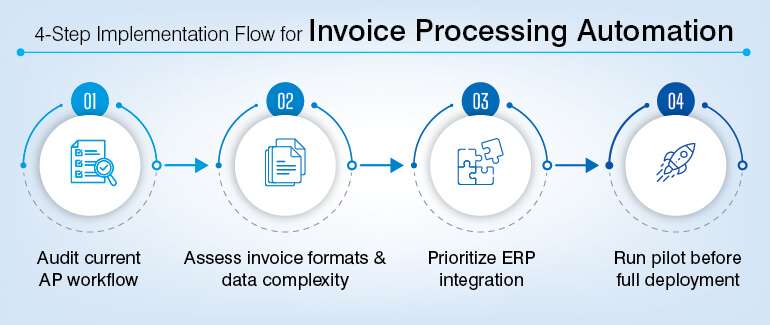
1. Audit the existing invoice processing workflow
The first step before you implement the automation process is a complete audit of the workflow.
Identify invoice intake channels, approval paths and manual validation steps. Also identify how the exceptional handling works, the ERP posting processes and approval bottlenecks.
Check the complete invoice-to-pay lifecycle. This will help you identify any repetitive, error-prone steps that needs to be automized.
2. Assess invoice formats and data complexity
The kind of invoice formats your company receives will determine the automation you would need. Invoices come in multiple formats like PDF email attachments, scanned invoices, EDI feeds or even image-based documents.
It is simpler to process structured invoices just with OCR. But for unstructured or multiformat invoices you will require Intelligent Document Processing (IDP) with machine learning-based field recognition and validation.
3. Prioritize ERP and accounting system integration
The automation system should be such that it allows invoice to directly integrate with ERP and accounting platforms. Building this system is important to avoid any manual re-entry.
The plan must be clear on ERP integration requirements, vendor master synchronization and GI coding workflows. There should be complete clarity on PO matching rules and payment scheduling logic.
Systems such as SAP S/4HANA, Oracle Financials, Microsoft Dynamics 365, or NetSuite are mostly used by the enterprises. However, prebuilt ERP connectors are also used that generally simplify deployment.
4. Run a controlled pilot before full deployment
Before you implement the complete process, it is a good idea to start with a pilot. The pilot phase would help you identify if the system had any issues or whether it needed to be modified.
You could validate the OCR extraction accuracy, ERP posting accuracy or touchless processing capability.
Pilot results help develop a fully accurate workflow. Any refinement needed could be addressed before the implementation of the automated system.
Invoice management systems need complete visibility and control across the workflow. Without proper management, businesses can face multiple operational and financial challenges.
Most important mistake businesses make is going for automation without fixing internal problems. Do an audit and fix any gaps in your system before getting into automation or else you will end up creating more issues.
Make your approval structures crystal clear. Ambiguity in approval structures will clog your automation system. To avoid any reconciliation issue later work on the ERP integration so that you avoid extra manual work later.
Invoices arrive in multiple formats which is beyond basic OCR. Depending on just OCR is another big mistake. To handle multiple format invoices, you will need AI enabled IDP and other advanced technology.
And finally, don’t ever skip pilot testing. Pilot testing will help you fix all kinds of flaws if any is in your system. And always include human review for exceptional cases.
However, structured is your automation system, you may still need human involvement at some point of time. Certain complex invoices may not give accuracy just by automation.
There are non-PO invoices, vendor disputes and tax discrepancies. For such cases human intervention is needed. Duplicate vendor records or high value payments requiring additional approval may need to go through human review.
Human review is also important when invoices contain inconsistent formats, handwritten content, or missing supporting documents that automated validation rules cannot process reliably.
Invoice automation reduces repetitive manual processing but may not remove finance oversight completely.
Businesses are adopting innovative approaches to traditional invoice processing. As businesses look towards a future that is replacing manual processes, invoice-processing strategies are moving towards automation.
Manual processes have their limitations, are high-cost, slow and error prone. With increase in volumes these inefficiencies become difficult to manage.
Implementing a streamlined, automated invoice processing system mitigates the risks of manual errors and late payments. It also offers valuable insights into your business’s financial health. Automation improves processing speed and accuracy offering better operational scalability.
Structured implementation is the key to successful invoice processing automation. Invest early in modernizing account payable operations for operational efficiency and compliance.
What’s next? Message us a brief description of your project.
Our experts will review and get back to you within one business day with free consultation for successful implementation.

Disclaimer:
HitechDigital Solutions LLP and Hitech BPO will never ask for money or commission to offer jobs or projects. In the event you are contacted by any person with job offer in our companies, please reach out to us at info@hitechbpo.com